


Automate Your Business with Make
Created By: ✅ Rising Automation
This template automates Google Forms submissions by seamlessly connecting them with Google Sheets, Email, and Microsoft Teams. It’s designed for teams that want instant response tracking, centralized data storage, and automated notifications without any manual effort. Perfect for streamlining form-driven workflows such as order management, lead capture, or internal requests.
Workflow Templates
Impress clients and stakeholders with a marketing strategy that runs on intelligent automation freeing your team to focus on creativity and growth.
How It Works
This workflow runs through three main stages that ensure data flows smoothly across your tools:
- Google Forms → Google Sheets:
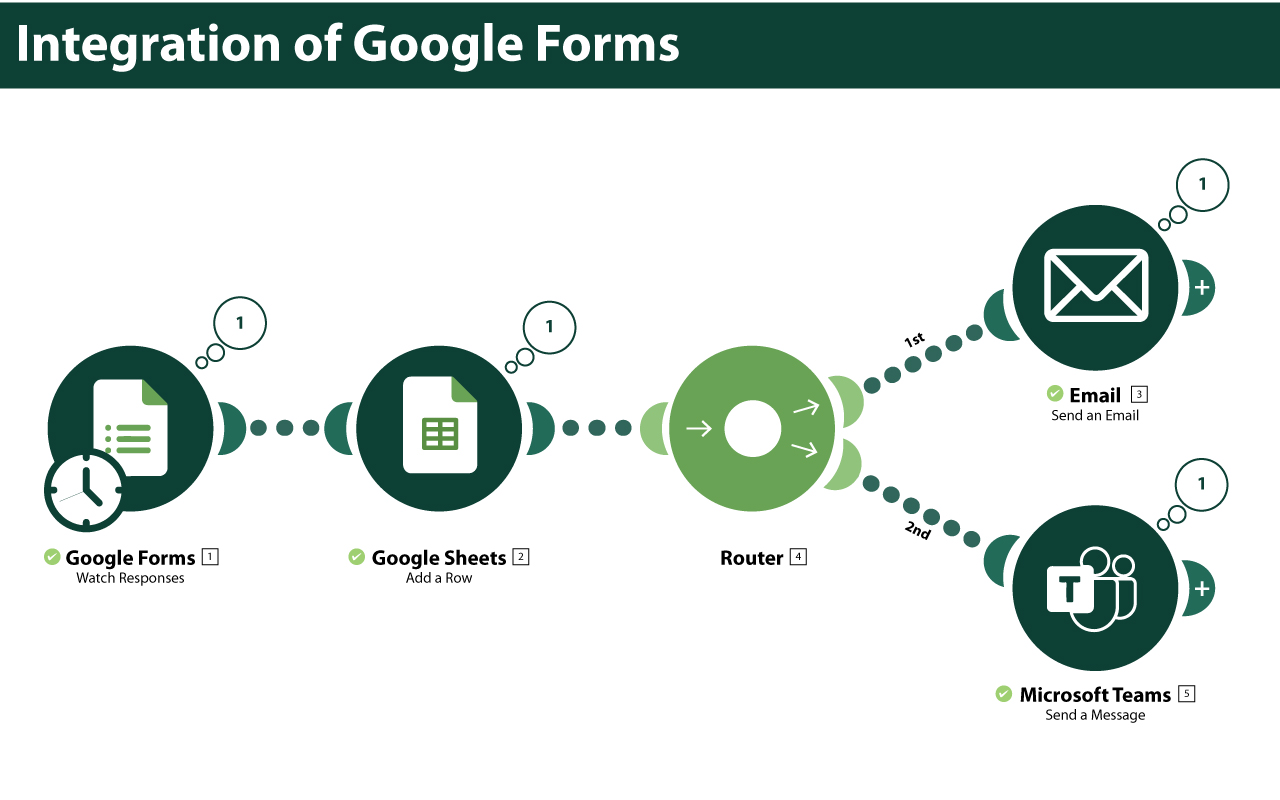
The automation starts when a new response is received in Google Forms. The system watches responses and automatically adds each submission as a new row in a connected Google Sheet — creating an organized, live-updating database. - Router for Smart Distribution:
A routing system evaluates conditions (like region or type of response) to determine the next steps. For example, orders from specific locations or departments can be processed differently. - Instant Notifications via Email & Teams:
- Email: The first route sends an automated email confirmation or alert to the designated recipients.
- Microsoft Teams: The second route posts a message in a selected Teams channel, ensuring your team stays informed in real time.
The visual workflow in the image shows these steps connected through automation nodes — Google Forms triggers the process, Google Sheets stores the data, and Router directs the output to Email and Teams simultaneously.
How To Use
- Connect Your Tools:
Ensure your Google Forms, Sheets, and Microsoft Teams accounts are properly connected to the automation platform. - Test the Workflow:
Submit a test form response to verify that data is being added to Google Sheets and that notifications are correctly triggered in Email and Teams. - Activate Automation:
Once verified, turn on the workflow. All future Google Form submissions will trigger automatic updates and messages. - Customize:
You can easily adjust the router’s rules, email templates, or Teams message content to fit your organization’s needs — such as adding filters for different departments or creating separate notification paths.
This integration template makes your data collection smarter and your communication instantaneous saving hours of manual coordination while keeping your entire team aligned.
Unlimited access
Start Automating Smarter Today
Start a free trial to see how Rising Automation can unlock revenue from your existing customers